

This post explains the concepts, workflows, and tools behind stacked pull requests (stacked PRs).
In a nutshell, with stacked pull requests we split a large feature into several smaller, coherent changes that build on one another so they can be independently reviewed, merged, and deployed.
Why Stacked Pull Requests?
Code reviews are essential for software quality—but let’s be honest: they’re also one of the biggest bottlenecks in modern development.
Often, authors get stuck waiting for feedback, thus losing valuable momentum. The reason for long waiting times (and also inefficient code reviews), are often large PRs. Large PRs mean that reviewers struggle with understanding the multiple, and complex changes that are often within one PR.
The outcome?
- Slow development cycles
- Higher risk of bugs
- Frustrated teams
Stacked PRs offer a way out. By structuring your work as a stack of smaller, dependent PRs, you can:
- Keep development flowing without waiting on merges
- Make code reviews shorter, clearer, and more effective
- Reduce the cognitive load for reviewers
- Build higher-quality software, faster
Typical Feature-Branch Workflow
Before looking at stacked-PRs, let’s quickly recap how a typical feature-branch workflow looks like. In a feature-branch workflow, you would start with a feature you want to implement, and create one new branch for said feature. Then, you make several changes (commits) to this branch, and once you finished your feature, you ask your colleagues to review the changes by opening one PR.
main
 \
  feature
Such traditional feature-branch workflows often lead to long-lived branches that diverge
from main for days or weeks. And it also means code reviews only happen once the feature is deemed complete and ready for review. Code reviews usually happen only once the feature is considered complete, which delays feedback. The longer a branch lives, the harder it becomes to keep in sync, the greater the risk of painful merge conflicts, and the more difficult the review process itself becomes.
The Stacked PR Workflow
In a stacked-PR workflow, you instead start by thinking about how you can split the feature into several coherent subtasks (think divide-and-conquer strategy).
Here we also follow the single responsibility principle, which is not only relevant when we design a software system, but also helpful as a principle for how we work.
This means that once we identified subtask of our task, we create new branches for each of the subtasks that we identified.
It’s important to know that this also means that the branches are dependent on each other. This means, only the first branch is
branched out of main. All the other branches, are branched out from the last subtask they depend on.
main
 \
  subtask-1
   \
    subtask-2
     \
      subtask-3
Such a stacked-PR approach leads to short-lived branches (as each subtask is its own branch), more frequent integrations, and more focused code reviews, which shorten review time and improve effectiveness.
In other words, stacked PRs nudge teams closer to the benefits of trunk-based development—without giving up the clarity and safety of code review.
Did you know that Meta (aka Facebook) implemented stacked branch development into their in-house build source control solution Sapling?
Feature-Branch Workflow
- Start working on the complete feature.
- Branch off `main` once to create one branch for this feature.
- Make all the changes needed to complete the feature on this one branch.
- Open one, often large PR.
- Wait for review, and approval.
- Merge the feature branch back into main.
- Only then start new dependent work.
In a feature-branch based workflow, every new (dependent) piece of work is blocked by the review and merge of the previous PR. If reviews are slow—or PRs are large—development gets bottlenecked.
Stacked-PR Workflow
- Split the feature into smaller, coherent subtasks.
- Branch off `main` for the first subtask.
- Open a PR for that subtask.
- Immediately branch from that branch (not main) for the next subtask.
- Open a PR for the second subtask, which depends on the first.
- Repeat for all further subtasks, creating a stack of PRs.
In a stacked-PR workflow, reviewers now see a sequence of smaller, focused PRs. Once the bottom PR is approved and merged, the stack syncs, and the next PR in line is ready to go.
Example: Stacked PRs in Action
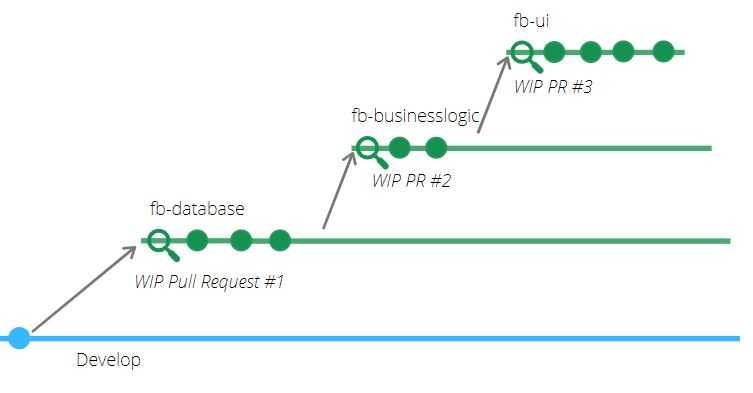
Imagine we’re working on a customer support system, and we want to add a new feature to our AI phone call bot: the ability to ask customers for their telephone number.
Instead of stuffing all changes into one branch and opening a 1,000-line or more PR, we start by splitting the work into smaller, coherent subtasks.
One way is to break down the feature itself according to our layered architecture: database, business logic, and UI changes:
-
Database layer
- Create a new branch
fb-databaseon top of branchdevelop - Implement database changes
- Open a PR for this work
- Create a new branch
-
Business logic
- Create a branch
fb-business-logicon top offb-database - Implement the feature logic
- Open a PR for this work
- Create a branch
-
UI layer
- Create a branch
fb-uion top offb-business-logic - Implement the UI changes
- Open a PR for this work
- Create a branch
Because each branch builds on the last, the full feature is always present locally. But reviewers only see the incremental change in each PR.
This makes reviews easier: reviewers can focus on one coherent piece at a time, which helps them build a better mental model and provide higher-quality feedback.
One commit per PR?
Some workflows or tools (like Google’s Critique or Gerrit) enforce a single commit per pull request, which enforces a strict separation of changes. While this can be useful, it’s not strictly necessary in a stacked PR workflow—you can choose the level of granularity that works best for your team.
Manually Stacking PRs
If you want to start using stacked-PRs right away and are using a Git based version control system, then you do not need anything else than a couple of native Git commands, some practice of breaking up work into smaller subtasks, and quite a bit of patience for syncing changes and handling merge conflicts.
I describe all the commands, as well as merge and rebase strategies for this in this blog post about manually stacking PRs.
Yet, because Git was not designed for this workflow, the day-to-day work with manually stacked PRs means you have to painfully rebase or merge every branch and resolve cascading conflicts, which often requires a lot of time-consuming, tedious, and error-prone workarounds. This limits the gains developers get from a stacked-based workflow.
Fortunately, over the last years, several tools have been created that ease usage of stacked-PRs workflows.
So, let’s look at them!
Tool-Support for Stacked PRs
Modern tools like Graphite, ghstack, git town, spr, and Sapling automate much of this process, making stacked PRs practical for day-to-day development.
Teams that adopt stacking often discover they naturally break work into 5–10 smaller PRs instead of one massive one. The benefits are immediate: faster reviews, higher-quality code, and less frustration on both sides of the process.
Sapling by Meta
Sapling is a new source code management system made by Meta. Its goal is to make software development easier, especially by simplifying source control workflows. As Git currently rules the world, it is compatible with Git repositories. One of its main features is stacked workflows, as they state also on the website: “Sapling provides convenient methods for stacking, iterating on, and submitting your work for code review. It removes the hassle of branches and the dreaded “detached HEAD” state.”
SPR
SPR is an open source CLI tool that allows you to create and manage stacked pull requests. The approach behind SPR is that each commit (yes each commit) becomes its own pull request. While this might seem excessive for you, this is also how tools like Gerrit or Critique work, which are used by Google, and lead to smaller, more focused PRs. When using SPR, you do not have to create new branches. Instead, you create one branch, and then commit your work, subtask, by subtask to the branch. SPR takes care of opening up PRs for each of the commits, while using the commit message as the PR title. It’s important that you keep using the tool for merging, as otherwise, you could end up merging changes together in an order that probably makes no sense.
Git Town
Git Town describes itself as “your Bash scripts for Git”. It allows developers to use common
Git workflows in a framework like manner. It’s compatible with branching models like GitHub Flow, Git Flow, GitLab Flow and also trunk-based development.
It also has built-in scripts to handle the stacked PR use case. This means it allows to review complex changes as a series of smaller feature branches that build on top of each other.
Again, the idea of stacking is implemented as if we would do it manually, yet, the tool helps us
with the tedious tasks of syncing (aka git town sync).
Graphite
Also Graphite builds on top of Git, and aims at improving the experience of developer while working with source code, including reviewing it. Their philosophy follows a trunk-based development workflow, where tiny changes are packaged in stacked PRs and frequently integrated. But apart from the other CLI based tools discussed before, Graphite also provides a rich user interface. One part of the functionality is helping developers manage and review their stacked PRs. For that, they even provide you with a dedicated review user interface, even though Graphite integrates seamlessly with GitHub.
Summary
Stacked pull requests allow developers to break large, hard-to-review changes into a series of smaller, dependent PRs. Instead of waiting for one PR to merge before starting the next, developers can keep working by branching on top of previous work. Reviewers benefit from focused, incremental changes that are easier to understand and provide feedback on. While managing stacked PRs manually can be tedious, modern tools like Graphite, ghstack, spr, and git-town automate much of the workflow. The result: faster reviews, higher-quality feedback, and smoother collaboration.
Feature-Branch Workflow
- One branch for the whole feature
- One often large PR
- Blocked until review + merge
Downside: Long-lived branches, big PRs, delayed integration.
Stacked-PR Workflow
- Multiple short-lived branches
- Each subtask has its own PR
- Parallel development + review
Benefit: Faster reviews, less context switching, codebase stays close to main.
If your team is struggling with large PRs, painful reviews, or stale feature branches, give stacked PRs a try.
👉 Your future self (and your reviewers) will thank you.
So, happy stacking!
