

This post explains the concepts, workflows, and tools behind stacked pull requests (stacked PRs).
In a nutshell, with stacked pull requests we split a large feature into several smaller, coherent changes that build on one another so they can be independently reviewed and then merged in dependency order.
Why Stacked Pull Requests?
Code reviews are essential for software quality—but let’s be honest: they’re also one of the biggest bottlenecks in modern development.
Often, authors get stuck waiting for feedback, thus losing valuable momentum. The reason for long waiting times (and also inefficient code reviews), are often large PRs. Large PRs mean that reviewers struggle with understanding the multiple, and complex changes that are often within one PR.
The outcome?
- Slow development cycles
- Higher risk of bugs
- Frustrated teams
Stacked PRs offer a way out. By structuring your work as a stack of smaller, dependent PRs, you can:
- Keep development flowing without waiting on merges
- Make code reviews shorter, clearer, and more effective
- Reduce the cognitive load for reviewers
- Build higher-quality software, faster
What Does Research Say?
There is empirical support for decomposing large changes, but the results are more nuanced than “smaller is always faster.” A controlled experiment with 28 developers compared one tangled pull request with the same change split into two logically coherent pull requests. Reviewers of the decomposed change reported fewer false-positive issues and approached the review differently. However, they did not find significantly more defects, finish faster, or understand the change rationale better.
This supports the central idea behind stacked PRs: separate different concepts into coherent review units. It does not mean that stacking automatically guarantees faster or higher-quality reviews. The quality of the decomposition, the reviewer, and the surrounding workflow still matter.
Typical Feature-Branch Workflow
Before looking at stacked-PRs, let’s quickly recap how a typical feature-branch workflow looks like. In a feature-branch workflow, you would start with a feature you want to implement, and create one new branch for said feature. Then, you make several changes (commits) to this branch, and once you finished your feature, you ask your colleagues to review the changes by opening one PR.
main
 \
  feature
Such traditional feature-branch workflows often lead to long-lived branches that diverge
from main for days or weeks. And it also means code reviews only happen once the feature is deemed complete and ready for review. Code reviews usually happen only once the feature is considered complete, which delays feedback. The longer a branch lives, the harder it becomes to keep in sync, the greater the risk of painful merge conflicts, and the more difficult the review process itself becomes.
The Stacked PR Workflow
In a stacked-PR workflow, you instead start by thinking about how you can split the feature into several coherent subtasks (think divide-and-conquer strategy).
Here we also follow the single responsibility principle, which is not only relevant when we design a software system, but also helpful as a principle for how we work.
This means that once we identified subtask of our task, we create new branches for each of the subtasks that we identified.
It’s important to know that this also means that the branches are dependent on each other. This means, only the first branch is
branched out of main. All the other branches, are branched out from the last subtask they depend on.
main
 \
  subtask-1
   \
    subtask-2
     \
      subtask-3
Such a stacked-PR approach can keep changes smaller and branches shorter-lived—provided the bottom of the stack is integrated frequently. It also creates more focused review units and enables feedback to start before the complete feature is finished.
In other words, stacked PRs nudge teams closer to the benefits of trunk-based development—without giving up the clarity and safety of code review.
Did you know that Meta develops Sapling, a Git-compatible source control system with first-class support for stacked commits and submitting them as GitHub pull requests?
Feature-Branch Workflow
- Start working on the complete feature.
- Branch off `main` once to create one branch for this feature.
- Make all the changes needed to complete the feature on this one branch.
- Open one, often large PR.
- Wait for review, and approval.
- Merge the feature branch back into main.
- Only then start new dependent work.
In a feature-branch based workflow, every new (dependent) piece of work is blocked by the review and merge of the previous PR. If reviews are slow—or PRs are large—development gets bottlenecked.
Stacked-PR Workflow
- Split the feature into smaller, coherent subtasks.
- Branch off `main` for the first subtask.
- Open a PR for that subtask.
- Immediately branch from that branch (not main) for the next subtask.
- Open a PR for the second subtask, which depends on the first.
- Repeat for all further subtasks, creating a stack of PRs.
In a stacked-PR workflow, reviewers now see a sequence of smaller, focused PRs. Once the bottom PR is approved and merged, the stack syncs, and the next PR in line is ready to go.
Example: Stacked PRs in Action
Imagine we’re working on a customer support system, and we want to add a new feature to our AI phone call bot: the ability to ask customers for their telephone number.
Instead of stuffing all changes into one branch and opening a 1,000-line or more PR, we start by splitting the work into smaller, coherent subtasks.
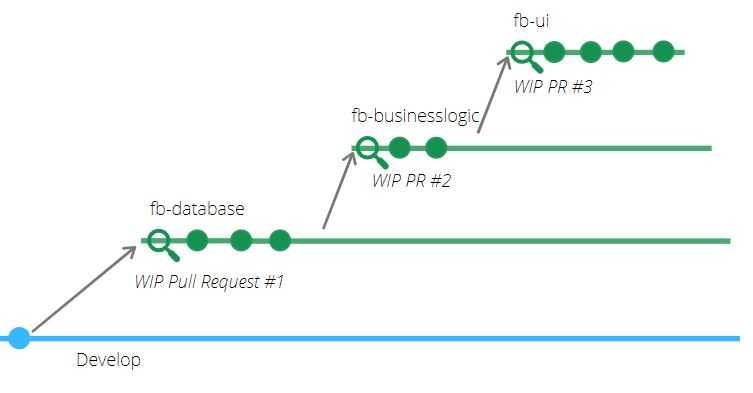
One way is to break down the feature itself according to our layered architecture: database, business logic, and UI changes:
-
Database layer
- Create a new branch
fb-databaseon top of branchdevelop - Implement database changes
- Open a PR for this work
- Create a new branch
-
Business logic
- Create a branch
fb-business-logicon top offb-database - Implement the feature logic
- Open a PR for this work
- Create a branch
-
UI layer
- Create a branch
fb-uion top offb-business-logic - Implement the UI changes
- Open a PR for this work
- Create a branch
Because each branch builds on the last, the full feature is always present locally. But reviewers only see the incremental change in each PR.
This makes reviews easier: reviewers can focus on one coherent piece at a time, which helps them build a better mental model and provide higher-quality feedback.
One commit per PR?
Some workflows or tools (like Google’s Critique or Gerrit) review each commit as a separate change, which enforces a strict separation of changes. Gerrit also supports stacking commits so they can be reviewed individually and submitted together. While this can be useful, a branch-based stacked PR does not have to contain only one commit—you can choose the level of granularity that works best for your team.
Manually Stacking PRs
If you want to start using stacked-PRs right away and are using a Git based version control system, then you do not need anything else than a couple of native Git commands, some practice of breaking up work into smaller subtasks, and quite a bit of patience for syncing changes and handling merge conflicts.
I describe all the commands, as well as merge and rebase strategies for this in this blog post about manually stacking PRs.
Yet, because Git was not designed for this workflow, the day-to-day work with manually stacked PRs means you have to painfully rebase or merge every branch and resolve cascading conflicts, which often requires a lot of time-consuming, tedious, and error-prone workarounds. This limits the gains developers get from a stacked-based workflow.
Fortunately, over the last years, several tools have been created that ease usage of stacked-PRs workflows.
So, let’s look at them!
Tool-Support for Stacked PRs
Modern tools like Graphite, ghstack, git-spice, Git Town, SPR, Sapling, and Aviator automate much of this process, making stacked PRs practical for day-to-day development.
Sapling by Meta
Sapling is Meta’s open-source, cross-platform, and highly scalable source control system. It is compatible with Git repositories, but unlike a typical Git workflow, it can represent a stack as a sequence of commits without requiring a named branch for every change.
With
sl pr submit,
Sapling creates or updates one GitHub pull request for every commit in the local
stack. These are overlapping PRs that all target the main branch. Sapling
therefore also provides ReviewStack, a review
interface designed to display this type of stack more clearly.
SPR
SPR is an open source CLI tool that allows you to create and manage stacked pull requests. The approach behind SPR is that each commit (yes each commit) becomes its own pull request. While this might seem excessive for you, this is also how tools like Gerrit or Critique work, which are used by Google, and lead to smaller, more focused PRs. When using SPR, you do not have to create new branches. Instead, you create one branch, and then commit your work, subtask, by subtask to the branch. SPR takes care of opening up PRs for each of the commits, while using the commit message as the PR title. It’s important that you keep using the tool for merging, as otherwise, you could end up merging changes together in an order that probably makes no sense.
ghstack
ghstack also uses a commit-based model: you
prepare a series of commits and it submits each commit as a separate GitHub pull
request. It uses synthetic base and head branches so that every PR shows only
its own incremental change, and stacks must be landed with ghstack land
rather than the normal GitHub merge button.
Recent versions can optionally use Claude or Codex to generate descriptions for stack updates. For an existing PR, the agent receives the interdiff—the change since the last submitted version—rather than the entire PR.
git-spice
git-spice is an open-source tool for creating, navigating, restacking, and submitting stacks of Git branches. Unlike several GitHub-specific tools, it supports pull or merge requests across GitHub, GitLab, Bitbucket, Gitea, and Forgejo. It also works locally without an external service until you push or pull from a remote repository.
Git Town
Git Town provides additional Git commands for creating, synchronizing, shipping, and cleaning up branches. It’s compatible with branching models like GitHub Flow, Git Flow, GitLab Flow, and trunk-based development.
For stacked changes, Git Town can append or prepend branches, change parent
relationships, reorder or combine adjacent branches, and detach a branch from a
stack. It also automates the tedious work of keeping the stack synchronized
with git town sync.
Aviator
Aviator’s open-source CLI manages parent-child relationships between GitHub pull requests, synchronizes dependent branches, and integrates stacks with a stack-aware merge queue.
Aviator has also started connecting stacked PRs directly with agentic
development. Its agent plugin teaches coding
agents to use the stack-aware av branch, av pr, and av sync commands
instead of raw Git operations. Aviator Runbooks can execute a larger task in
steps and
produce one stacked PR per step,
giving human reviewers incremental checkpoints instead of one large
agent-generated change.
Graphite
Graphite builds on top of Git and integrates with GitHub. Its workflow packages small changes as stacked PRs that can be created with a CLI and reviewed in a dedicated web interface. Graphite also provides a stack-aware merge queue that lands approved changes in the correct order.
In December 2025, Graphite announced that it was joining Cursor while continuing to operate as an independent product. The integration now brings agent-generated pull requests into the same review and merge environment, while Graphite continues to invest in its stacked-PR workflow.
Stacked PRs in Agentic Development
Stacked PRs can be particularly useful when a coding agent is working on a large task whose parts genuinely depend on one another. A stack turns the agent’s output into bounded review units: for example, a schema change, followed by service logic, followed by the UI. Reviewers can validate the foundation before approving the layers built on top of it.
However, agent-generated work should not be stacked merely because several agents are working in parallel. Independent tasks are usually better handled as independent branches and PRs. A stack is most useful when it represents a real dependency chain and a coherent review narrative.
Early research on agent-authored pull requests reinforces the importance of keeping those review units manageable, but does not yet prove that stacked agent PRs outperform monolithic ones. A 2026 empirical study found that larger agent-authored changes and force pushes were associated with a lower likelihood of merging, while reviewer engagement had the strongest relationship with successful integration. Another 2026 study of review activity found that many agent-authored PRs had no recorded review and that review comments were often produced by other agents. Splitting work into a stack can improve reviewability, but it does not by itself guarantee human oversight.
For agent-generated stacks, keep the stack shallow, give each PR one clear purpose, use stack-aware tooling to avoid cascading rebases, and make a human author responsible for reviewing each layer before requesting review from others.
Summary
Stacked pull requests allow developers to break large, hard-to-review changes into a series of smaller, dependent PRs. Instead of waiting for one PR to merge before starting the next, developers can keep working by branching on top of previous work. Reviewers benefit from focused, incremental changes that are easier to understand and provide feedback on. While managing stacked PRs manually can be tedious, modern tools like Graphite, ghstack, git-spice, SPR, Git Town, Sapling, and Aviator automate much of the workflow. Used for genuine dependency chains, stacks can enable earlier feedback and smoother collaboration without requiring reviewers to digest one monolithic change.
Feature-Branch Workflow
- One branch for the whole feature
- One often large PR
- Blocked until review + merge
Downside: Long-lived branches, big PRs, delayed integration.
Stacked-PR Workflow
- Multiple short-lived branches
- Each subtask has its own PR
- Parallel development + review
Potential benefit: Earlier feedback, less context
switching, and changes that stay closer to main.
If your team is struggling with large PRs, painful reviews, or stale feature branches, give stacked PRs a try.
👉 Your future self (and your reviewers) will thank you.
So, happy stacking!
